
Church's App vs DoorDash & Uber Eats Delivery Price Guide (2026)
By Church's Editorial Team | Published Aug 1, 2026 | Updated Aug 16, 2026
The cheapest Church's delivery choice is not fixed. Compare the same cart in the Church's app, pickup, DoorDash, and Uber Eats because fees, rewards, coupons, address distance, and menu availability can change the total.
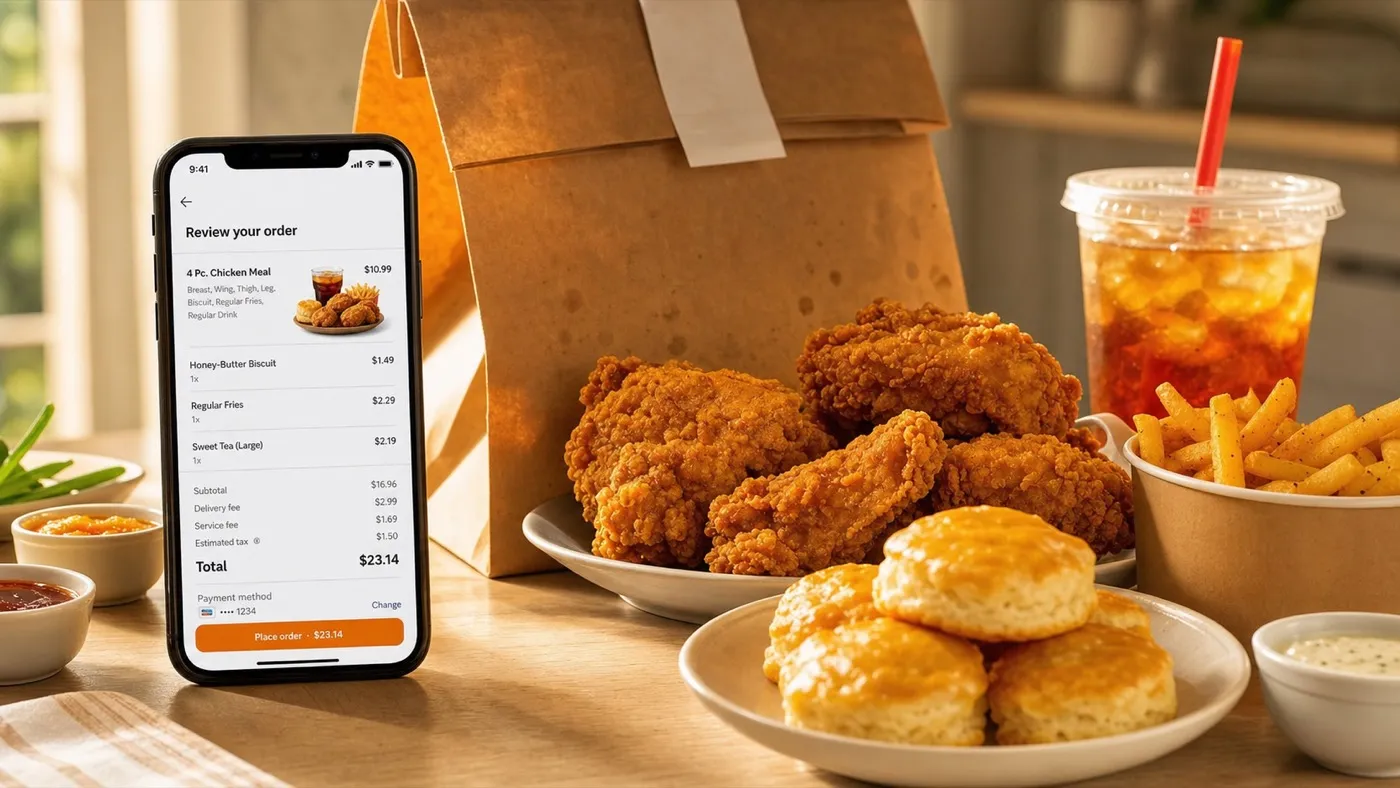
Fixed delivery totals are risky because delivery platforms calculate fees by restaurant, location, order size, distance, demand, subscription status, taxes, and live promotions. A better guide compares each checkout layer.
A better menu guide shows the exact checkout layers to compare. That helps users understand the real cost of a chicken combo, tenders box, family meal, biscuits, sauces, sides, drinks, and sweet treats before they press place order.
Reviewed by Church's Editorial Team.
Prices, calories, allergens, offers, participation, and availability can change by restaurant and date, so final ordering decisions should use the selected restaurant checkout.
Is The Church's App Cheaper Than DoorDash Or Uber Eats?
The Church's app is often the first channel to check because it supports pickup, delivery, saved checkout, rapid reorder, exclusive in-app deals, and eligible Real Rewards earning. Still, the live checkout total decides.
Apple App Store and Google Play listings describe the Church's app as a free app for ordering ahead, getting delivery, saving information for faster checkout, reordering favorites, receiving offer alerts, and earning Real Rewards.
The strongest rewards data point is 10 points for every eligible $1 spent. Church's app listings also describe a first-purchase free chicken choice of a 2PC Leg & Thigh or 3PC Tenders with a purchase, plus member-only deals.
Official Real Rewards terms add a major comparison point: orders placed through third-party ordering platforms such as DoorDash, Uber Eats, or ezCater do not earn Church's points. A marketplace subscription, app promo, or shorter delivery route can still change the final math.
| Ordering Channel | Best Use | Money Factor | Menu Risk | What To Check First |
|---|---|---|---|---|
| Church's App Pickup | Lowest friction for local pickup | No consumer delivery fee for pickup | Local store availability | Rewards, coupon, pickup time |
| Church's App Delivery | Direct ordering with rewards | 10 points per eligible $1 and member deals | Delivery coverage can vary | Delivery fee, service fee, final total |
| DoorDash | Marketplace delivery and pickup | Fees vary by distance and order size | Church's points do not apply | Subtotal, fees, DashPass, promo |
| Uber Eats | Delivery, pickup, scheduling | Fees vary by merchant, location, demand | Church's points do not apply | Arrival time, fees, Uber One, promo |
| Drive-Thru | Fast local meal without delivery | Avoids delivery fees and tip | Requires travel | Hours, coupon, item availability |
What Fees Can Change A Church's Delivery Total?
Delivery totals can include item subtotal, delivery fee, service fee, taxes, tip, small-order fee, long-distance or long-range fee, regulatory fee, weather fee, optional priority or express fee, and promo discounts.
DoorDash says its late-July 2026 U.S. fee update can include a variable service fee based on distance and order size, a fixed delivery fee that varies by merchant, long distance fees, regulatory response fees, small order fees, weather impact fees, and optional express delivery fees.
Uber Eats says delivery fees vary by merchant, location, demand, and nearby courier availability. Its help page also describes service fees, long range fees, small order fees, delivery adjustment fees, marketplace fees, priority delivery fees, taxes, and local operating fees where applicable.
These fee layers explain why one small chicken sandwich order can feel expensive while a larger family meal may spread the delivery cost across more people. The best comparison is always total cost per person, not only menu item price.
| Checkout Line | Why It Appears | Where It Can Change | How To Reduce It |
|---|---|---|---|
| Item Subtotal | Food before fees | Store, platform, local menu | Compare same items across carts |
| Delivery Fee | Delivery access and logistics | Merchant, address, membership | Use pickup or eligible promo |
| Service Fee | Platform/order processing | Order value, distance, market | Compare direct app vs marketplace |
| Small Order Fee | Low subtotal order | Platform rules and minimums | Add planned item or use pickup |
| Long Distance Fee | Farther restaurant route | Distance from store to address | Choose nearer Church's location |
| Busy Or Weather Fee | High demand or difficult delivery | Weather, rush time, market | Wait, pickup, or schedule later |
| Tip | Courier gratuity | User choice and order size | Budget it before comparing totals |
How Should You Compare The Same Church's Cart?
Build the same cart in each channel before judging price. Use identical chicken pieces, tenders, sides, biscuits, sauces, drinks, desserts, address, delivery time, and tip assumptions.
This is important because platforms can show different item groups. DoorDash currently lists Church's categories such as Limited Time Offers, Specials, Individual Meals, Family Meals, Real Deals, Party Packs, Ice-Cold Drinks, Sauces, Sides, Sweet Treats, and Extras.
Uber Eats says Church's delivery is available, selections vary by location, delivery can be tracked in real time, delivery can be scheduled for a future date and time, and pickup may be available at participating locations.
A fair test does not compare a tender-only order in one app against a combo in another. Match the 3PC or 5PC tenders, side size, drink size, biscuit count, dipping sauces, jalapeño pepper, and dessert before comparing totals.
| Cart Part | Match This Exactly | Common Mistake | Better Comparison |
|---|---|---|---|
| Chicken Base | Piece count and type | Comparing chicken-only with combo | Same 2PC, 3PC, 4PC, or 10PC setup |
| Tenders | Tender count and sauce count | Ignoring paid extra sauces | Match sauce cups and dipping needs |
| Family Meal | Chicken, sides, biscuits | Missing included biscuit count | Compare full family meal bundle |
| Sides | Regular vs large size | Mixing regular fries with large sides | Match size and quantity |
| Drinks | Drink size and gallon drinks | Forgetting drinks in one cart | Match beverage count |
| Desserts | Pie or sweet treat quantity | Leaving dessert out of one app | Match all add-ons before checkout |
Which Church's Orders Work Best For Delivery?
Delivery works best when the order feeds more than one person or when convenience matters more than the fee. Family meals, party packs, and group lunches usually spread fees better than one small item.
A small order can carry the same delivery-style fee categories as a larger order. That makes a single biscuit, sauce, side, or sandwich less efficient unless you have a strong promo or subscription benefit.
Family meals are easier to justify because the cart may include chicken pieces or tenders, multiple sides, biscuits, sauces, and drinks for more people. The per-person cost can look better even when the checkout includes fees and tip.
| Church's Order Type | Delivery Fit | What To Add Carefully | Savings Tip |
|---|---|---|---|
| Single sandwich | Weak unless promo applies | Drink, fries, sauce | Pickup is usually cleaner |
| 2PC or 3PC meal | Good for one person | Side size and drink | Compare app pickup vs delivery |
| 3PC or 5PC tenders | Good for sauce-focused orders | Dipping sauce count | Check extra sauce price |
| 10PC family meal | Strong for shared dinner | Sides, biscuits, drinks | Split final total per person |
| Party pack | Best for group planning | Large sides, tea, desserts | Order ahead and confirm timing |
When Should You Use DoorDash Or Uber Eats For Church's?
Use DoorDash or Uber Eats when they show better availability, faster delivery, a valid promo, subscription benefits, scheduling, or pickup access that the direct channel does not show for your address.
DoorDash is useful when you already use DashPass or when a nearby Church's storefront shows a better time, pickup option, or active marketplace promotion. DoorDash also warns that prices are estimated by predicted location and may vary by store.
Uber Eats is useful when the local storefront shows the right items, a good arrival time, scheduling for later, or pickup at a participating location. Uber also displays applicable fees at checkout before the order is placed.
The key is not loyalty to one app. The key is checking the same Church's cart across the direct app, marketplace delivery, marketplace pickup, and drive-thru route before choosing the lowest practical total.
| Scenario | Best Channel To Check | Reason | Watch-Out |
|---|---|---|---|
| Rewards member | Church's app first | 10 points per eligible $1 and member deals | Third-party orders do not earn points |
| No delivery fee promo | Direct app or marketplace | Promo can beat normal fee stack | Minimum subtotal and expiry |
| Far address | Nearest available store | Distance can affect fees and timing | Long distance or long range fee |
| Group lunch | Direct app, catering, or marketplace | Large cart spreads fees | Confirm pickup/delivery window |
| Near closing | Store page and phone call | Kitchen cutoff can matter | Missing items or canceled order |
How To Save On Church's Delivery Orders
The highest-probability savings move is to compare pickup, direct app delivery, and marketplace checkout totals before paying. Rewards, coupons, distance, minimums, and item bundles decide the real winner.
Start with pickup if you can drive. Uber's help page says no consumer fees apply when you pick up the order through Uber Eats, and direct pickup avoids the delivery-fee layer entirely.
Next, check the Church's app. If a member-only deal, welcome reward, or 10-points-per-eligible-$1 earning applies, the direct app may give better long-term value than a marketplace cart with the same food subtotal.
Then compare DoorDash and Uber Eats only after the same cart is built. Look for delivery fee, service fee, tax, tip, long-distance fees, busy-area fees, express or priority options, and whether the same sauces and sides are actually in stock.
| Savings Move | Why It Works | Best Menu Match | Do This Before Paying |
|---|---|---|---|
| Choose pickup | Removes delivery fee and tip | Combos, tenders, small orders | Check store hours |
| Use Church's rewards | Earns 10 points per eligible $1 | Frequent orders, family meals | Log in before checkout |
| Build a larger planned cart | Spreads delivery fees | Family meals, party packs | Do not add random extras |
| Pick nearer location | May reduce distance fees | Any delivery order | Compare nearest storefront |
| Avoid peak demand | May avoid busy-area fee | Dinner and weekend orders | Schedule earlier if possible |
| Compare final checkout | Shows true total | Every order | Use same tip and address |
Church's Delivery Price FAQ
Is the Church's app always cheaper?
No. The Church's app can be the best first check because of rewards, app deals, pickup, delivery, and saved checkout, but live fees and promotions decide the final total.
Does DoorDash show the same Church's prices as the store?
DoorDash states that estimated prices are based on predicted location and may vary across stores. Enter your address and compare the item subtotal before treating any menu price as final.
Can Uber Eats deliver Church's Chicken?
Yes, Uber Eats lists Church's Texas Chicken delivery in the United States. It also says selections vary by location and pickup may be available at participating restaurants.
Do Church's Real Rewards points work on DoorDash or Uber Eats?
No. Official Real Rewards terms exclude orders placed through third-party ordering platforms, including DoorDash, Uber Eats, and ezCater. Use direct Church's ordering when points matter.
What is the best Church's order for delivery?
Family meals, party packs, and group orders usually make more sense than tiny carts because fees can be spread across chicken, sides, biscuits, drinks, and sauces for multiple people.
What should I check before ordering near closing time?
Check local store hours, kitchen cutoff, item availability, delivery time, and whether the app still accepts the order. Call the restaurant for large family meals or same-day catering.
Related Church's Menu Guides
- Return to the Church's Chicken Full Menu Prices.
- Check Church's Coupons & Current Deals.
- Review Church's Real Rewards App.
- Plan a group meal with Church's Family Meal Prices.